

What’s in this article
- The problem most agency owners pretend they don’t have — monday.com’s Progress column counts “Doing” tasks as 0%, so your dashboard lies.
- The fix in 200 lines of JavaScript — a Cloudflare Worker that calculates real, weighted progress.
- The weighting model that actually works — Done = 100%, Doing = 50%, Stuck = 25%. Stop treating “Done” as the only valid state.
- A 90-minute build, $0/month to run — full breakdown of where the time went.
- My $0.02: calculate on top, don’t replace the tool — the single biggest unlock I’ve had for AI automations this year.
🚀 Plug this into Claude Code or Claude Desktop
This spec gives you the full Worker code plus the exact build steps — board prep, weighting model, Cloudflare bindings, Slack webhook, and the failure modes I hit so you don’t have to. Drop it into Claude Code and it’ll wire the whole thing for your stack.
Want to see it built live or get help applying it to your own agency’s monday.com setup? That’s what the Talk-to-Build community is for.
I had 11 active client projects on monday.com. Every Monday morning I’d check the Progress column, get a number that didn’t match reality, then ask my creative director Anastasia for a status update anyway. The dashboard was decorative.
Last week I spent 90 minutes wiring up a small Cloudflare Worker + monday.com + Slack. Now every morning at 8 AM ET I get a one-message digest showing the real Mission % for all 11 projects, ranked, with day-over-day changes. Total monthly cost: $0.
Here’s exactly how I did it — and how I’d actually use this if you’re a designer or creative director drowning in client work.
The problem most agency owners pretend they don’t have
You run a design studio. Or a Shopify shop. Or a Webflow practice. You’ve got 8, 10, 12 clients on monday.com. Each project has 30-60 tasks.
You open Monday on a Monday morning. You see the Progress column. It says 4%. 7%. 12%. You think that can’t be right, we shipped the homepage last week.
You’re not wrong. Monday is wrong.
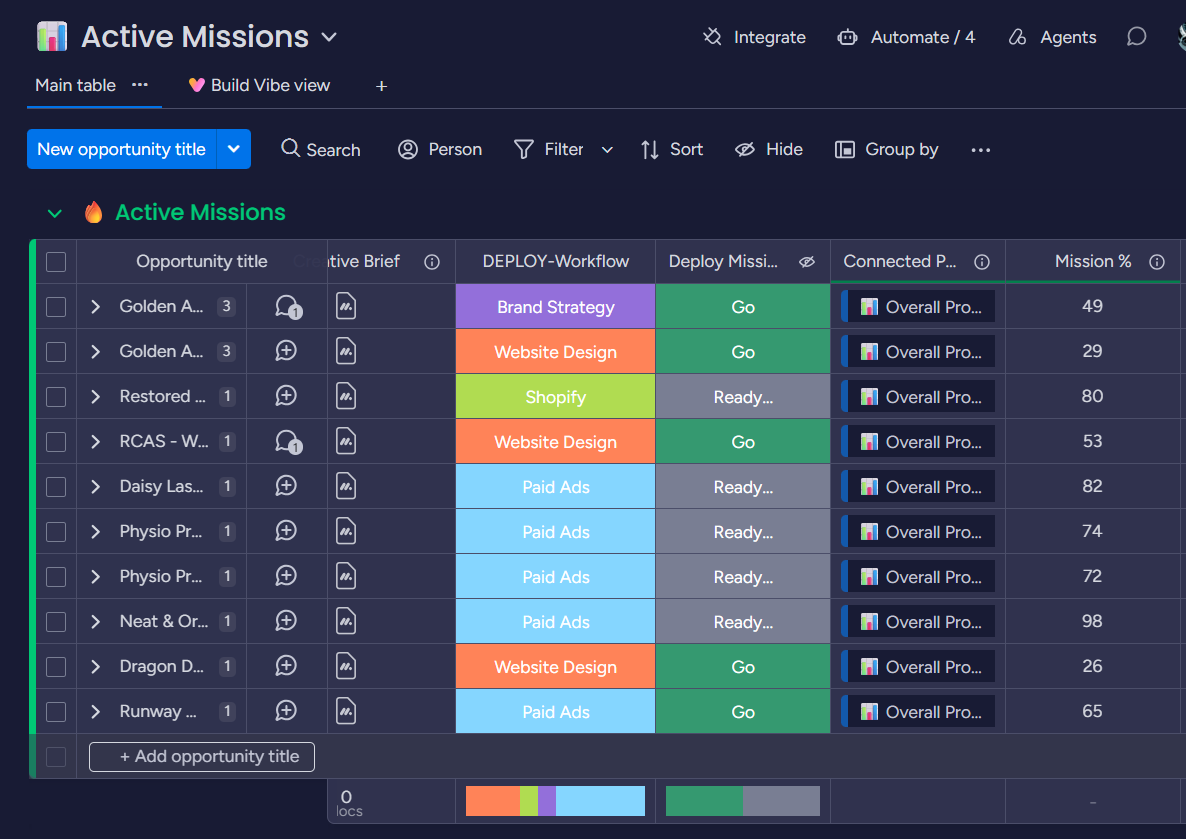
Here’s the actual problem: Monday’s Progress column only counts tasks where the status label has is_done=true. That’s the green “Done” label. Everything else — Doing, Working on it, Internal Review, Awaiting Client — counts as zero. Even if your team is 90% through, your dashboard reads 10%.
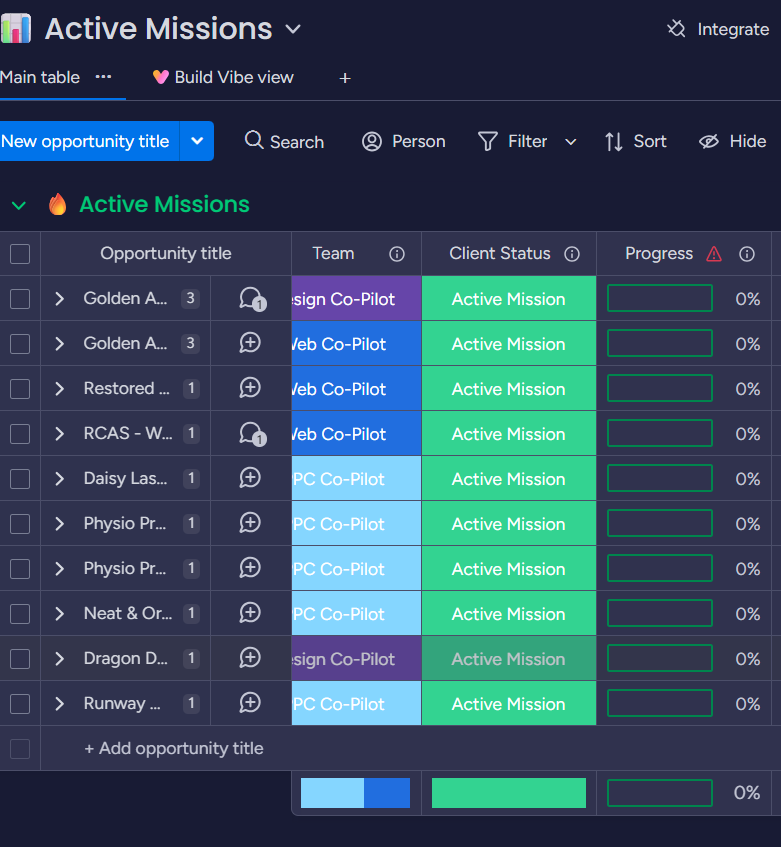
I lived with this for two years. The dashboard was always wrong, so I ignored it and asked my team instead. Multiply that by 11 clients and you get a real PM tax — call it 30-60 minutes a day chasing what should be visible at a glance.
What I built instead
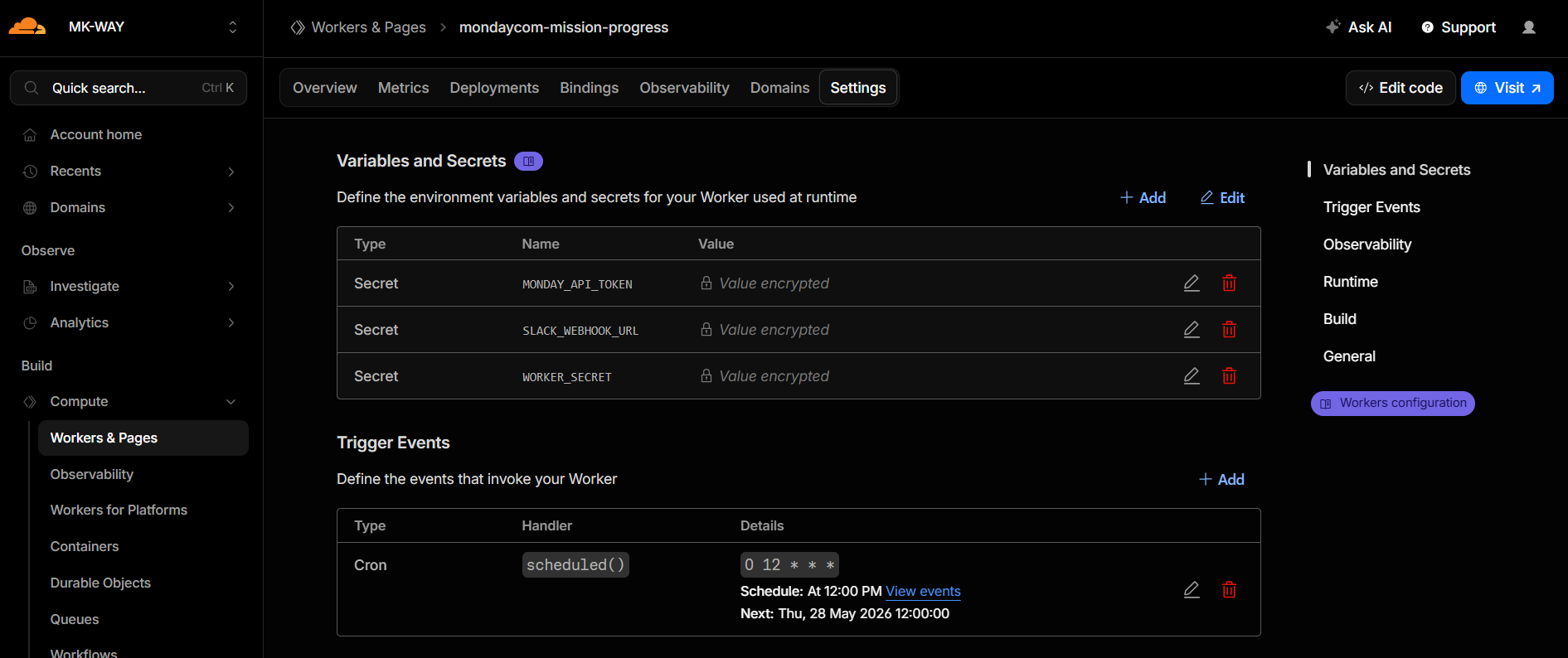
A small Cloudflare Worker — about 200 lines of JavaScript — that runs once a day at 8 AM ET. It:
- Reads the status of every task on each of my 11 client boards via the monday.com API.
- Calculates a weighted Mission % using real-world weights (Done = 100%, Doing = 50%, Stuck = 25%, etc.).
- Writes the percentage back into a new “Mission %” column on each board’s summary item.
- Stores yesterday’s % per board in Cloudflare KV so today’s message shows day-over-day deltas.
- Posts a clean digest to my Slack #mission-brief channel.
That’s it. No SaaS subscription. No new tool to onboard. Lives entirely on free-tier Cloudflare.
Cloudflare Worker (cron: 8am ET daily)
       │
       ├── reads ──► monday.com API (status of N boards)
       │
       ├── computes ──► weighted % per board
       │
       ├── writes ──► monday.com API (Mission % column)
       │
       ├── stores ──► Cloudflare KV (yesterday's % for delta)
       │
       └── posts ──► Slack webhook (formatted digest)
The weighting model that actually works
Here’s the thing — most “PM dashboard” advice tells you to buy ClickUp or Notion or Asana on top of monday.com. That’s worse. Now you’ve got two tools to update.
What I do instead is keep monday.com as the source of truth and pipe a calculation on top of it. Same data. Better math. My team doesn’t change how they work.
Here’s the weighting model I use, and you can tune yours:
| Status | Weight | Why |
|---|---|---|
| Done / Mission Complete / Approved | 100% | Shipped |
| Internal Review / Client Review | 85% | Functionally done, waiting on eyeballs |
| Doing | 50% | Real work happening — credit it |
| Assigned / Stuck / On Hold | 25% | Visible but not progressing |
| Awaiting external | 10% | Blocked on the client |
| N/A / Rejected | excluded | Out of scope, doesn’t count |
The big insight: stop treating “Done” as the only valid state. Designers know this intuitively — a Hi-Fi mockup in Client Review is 85% done, not 0%. The Worker just encodes what your team already knows.
Monday isn’t wrong about the data. It’s wrong about the math. Once you separate those two, the fix is small.
What I see every morning now
A Slack message that lands at 8:00 AM, before my first matcha is brewed:
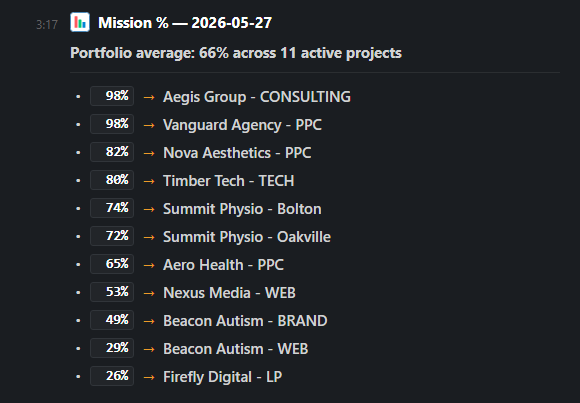
The arrows are day-over-day deltas. If a project jumped from 78% to 82% overnight, I see ↑4. If something dropped, I see ↓3 and I know to ask why. If you can talk it, you can build it — and this Worker turns “how’s everything going?” into a single Slack message I can read in five seconds.
My $0.02 — Calculate on top, don’t replace the tool
This pattern — calculate on top of the tool, don’t replace the tool — is the single biggest unlock I’ve had for AI automations this year. Most people try to migrate from monday.com to “something better.” The faster path is the opposite: keep your existing system, plug a brain into it.
If you’re a designer or creative director running multiple projects, here’s the truth: you don’t need to be more disciplined. You need real data. And the data is already in the tool you’re using — you just need to math it correctly.
This is part of how I run MK-Way: designer first, but I treat automation engineering as a peer skill, not a side hustle. The compounding is real. Same client work, half the visibility tax.
How long this took
| Phase | Time |
|---|---|
| Talking it through with Claude | 15 min |
| Adding “Mission %” columns to 11 monday.com boards (via API) | 5 min |
| Writing the Worker code | 30 min |
| Wiring Cloudflare Worker + KV + Slack | 25 min |
| Debugging (mostly PowerShell auth weirdness) | 15 min |
| Total | 90 minutes |
If you’re starting from scratch and use the spec I linked above, you should hit 45 minutes — most of the debugging time was rabbit-holing on auth issues you won’t have.
What you need to build your own
- monday.com account (any paid tier — needs API access)
- Cloudflare account (free tier is plenty — handles 100k Worker requests/day)
- Slack workspace
- Claude Code (this is what I used to write the Worker — saved me ~3 hours)
- 90 minutes
That’s it. No new SaaS bill. The whole thing runs free on Cloudflare’s Tier 1.
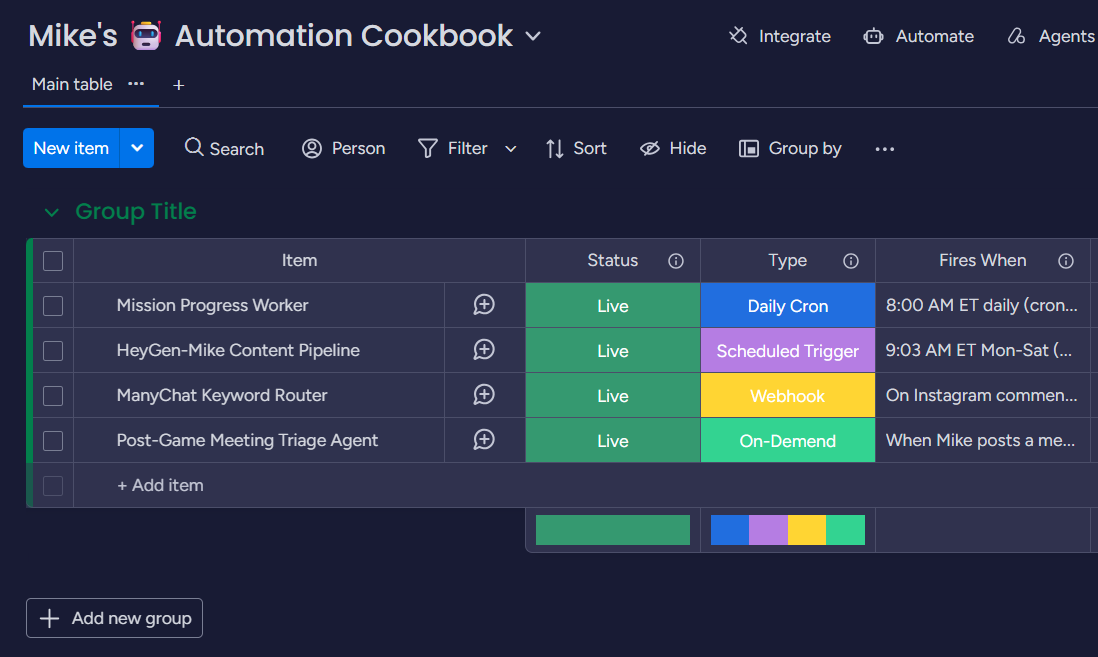
I also built a small “Automation Cookbook” board inside monday.com to track every automation like this that’s running in the background — kind of like a recipe book of all the things working for me without my involvement. Future hires read it top to bottom on day one.
FAQ
Does this work with ClickUp / Asana / Linear?
The pattern works with any tool that has a halfway-decent API. The specifics in the spec are monday.com — but swap the API calls and the math is identical.
What if I have 50 boards, not 11?
Same Worker. Just add more entries to the BOARDS array. Cloudflare’s free tier won’t care.
Why Cloudflare Workers and not a Node.js cron on my laptop?
Because your laptop turns off. Cloudflare runs cron in their infrastructure — your dashboard updates whether you’re awake, on a flight, or on vacation.
Do I need to be technical to build this?
You need to be technical enough to paste code into a web editor and click “Deploy.” That’s it. Claude Code writes the actual JavaScript. If you can follow the spec, you can ship this.
What about security? The Worker URL is public.
Add a Bearer token check (the spec shows you how) or use Cloudflare Access. For internal tools the threat model is low — anyone who guessed the URL could trigger a recomputation, but they can’t see data they don’t already have monday.com access to.
Can I show this to my team without breaking anything?
Yes. The Worker reads + writes one column. It doesn’t touch your existing workflows. Your team won’t notice the Worker exists — they’ll just see the new “Mission %” column populate every morning.
Want help applying this?
Four ways to go deeper:
- Build with Builders. Join the Talk-to-Build community to learn how to Earn money with AI, Download our AI skills, Advance your business, and build real assets — AI-native websites, cinematic AI video, agent-driven workflows — that you can sell to SMBs who want the outcomes but don’t have time to learn the skills.
- 1-on-1 working session. Skip the friction. Book a screen-share with me — bring your monday.com setup, leave with a working Mission % column populated.
- Done-for-you. MK-Way builds AEO-ready websites, apps, and AI agent workflows for design agencies and founders who want it shipped fast.
- Quick question. DM me on Instagram or connect on LinkedIn. I read every message.